SABO / John Deere
Prerequisites
Things you will need:
- SABO MOWiT 500F or John Deere Tango E5
- Open Mower V2 Carrier Board for SABO with all modules installed (xCore, CM4, GPS, 3x ESCs)


Tools you will need:
- M10 ratchet for the cover
- 5mm Allen key for the blade
- Torx T30 for the mainboard mount/holder
- Torx T20 for the mainboard
Step 2.4.1: Open the mower and remove the OEM mainboard 🔓
- Place the mower on its back and remove the six 10 mm screws from the housing.
- Remove the blade with the 5mm Allen key (right‑hand thread). Use gloves and secure the blade while loosening.
- Hold the housing together with both hands and place the mower back on its wheels.
- Slightly open the cover on the handle (rear) side by a few centimeters.
- Using a flashlight, disconnect the display ribbon cable(s):
- Series‑I: two ribbon cables going to the CoverUI. Each plug has small side locks; press to release, then unplug from the mainboard.
- Series‑II: one ribbon cable; pull it straight out from the mainboard (no release locks).
- You can now open the cover further. A single cable from the cover’s charging contacts goes toward the mainboard. Before the mainboard there is a 2‑pin Molex plug; press to unlock and disconnect it. Put the cover aside for later modification and reassembly.
- Disconnect all remaining cables from the OEM mainboard. Many plugs have a latch; press to release before pulling.
- The OEM mainboard is mounted on a black plastic mainboard holder. On its back side are two larger Torx T30 screws. Remove them to lift out the mainboard together with the holder.
- Remove the OEM mainboard from the holder by unscrewing the Torx T20 screws.
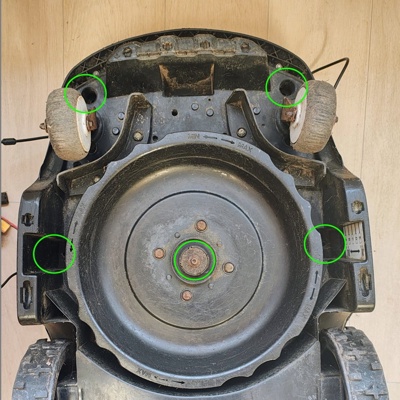 1-2 Release the cover and remove the mower blade
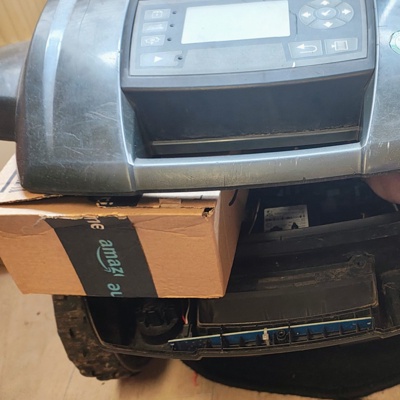 4-7 Slightly open the cover and disconnect cables
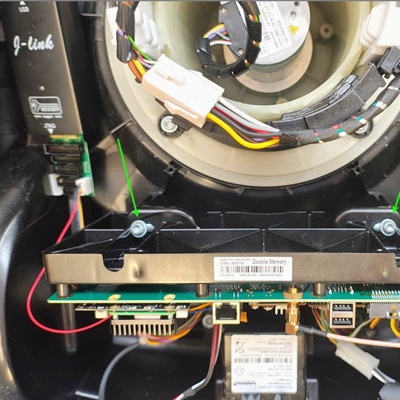 8 Release mainboard holder


Step 2.4.2: Mount prepared parts
Assemble the previously prepared parts:
- Mount your prepared UM9x GPS module to the carrier board and attach the IPEX/SMA cable (usually included with the UM9x) as shown:

- Mount your xCore + CM4 (+ optional heatsink) combo to the carrier board (if not already mounted)
Step 2.4.3 (optional): Install Wi‑Fi adhesive antenna 📶
The Wi‑Fi adhesive antenna can be placed as shown:


Step 2.4.4: Assemble carrier board with mainboard 🔩
Now that all modules are prepared and mounted, fasten the carrier board to the mainboard holder.
If you have fewer screws than holes, prioritize holes close to the larger connectors!Mount the carrier board + mainboard-holder back into the mower and fasten it with the two T30 screws.
Carefully connect all plugs. Some plugs fit into multiple counterparts, verify the labels or use this plug overview:
Series-I Plugs Series-II Plugs 

Note: some plugs are rotated — do not force any connector!
Step 2.4.5: Install GPS antenna (e.g. HA/HX‑901) on the cover 🛰️
An alternative non-destructive internal holder was designed by STS. Check the Discord discussion for more details and STL files if available.
- Drill a 6.5–7 mm hole in the cover approximately at the position as shown in the images.
- Install the (included) 30-40cm SMA extension cable. Ensure the SMA bulkhead protrudes far enough so the HA/HX‑901 can fully engage and make good contact; if in doubt, omit one washer/spacer on the inside to gain thread length.
Seal it from the top with silicone or a similar sealant. Don’t use too much sealant, so the HA/HX‑901 can still be screwed on later. - Also seal the inside thoroughly to prevent any water ingress. On the inside use sealant rule: More is better
- Allow sufficient time for the sealant to cure before proceeding.


Step 2.4.6: Close the housing ✅
- Place the cover back onto the mower. Let the front engage slightly, but keep the rear open enough to:
- Connect the GPS antenna cable to the carrier board
- Reconnect the docking‑contact cable
- Finally, reconnect the CoverUI ribbon cable(s)
- Close the cover completely so it fits and latches evenly all around
- Hold the housing together with both hands and turn the mower back onto its back
- Reinstall and fasten the six 10 mm hex‑head screws
- Do not install the blade yet
- Put the mower back on its wheels
- Finally, screw the HA/HX‑901 antenna onto the cover
Step 2.4.7: First Startup
It’s time to power the robot up by hitting the switch at the back of the robot.
Warning
If you see / smell anything unexpected, turn the switch off immediately!
This includes but is not limited to:
- Smoke / Fire
- Smell of hot electronics
- Blown Fuses
Once turned on, it will take approximately 10 seconds before the LEDs and LCD start to show signs of life. Keep the robot turned on for at least five minutes to make sure the CM4 boots up properly. It performs setup during the first boot.
Info
It’s a good idea to place the mower into the docking station, so that the battery doesn’t drain and can charge.If everything seems healthy, proceed to the Software Setup.
Otherwise, stop here and ask for help on the Discord server.